


Void Tunnel
Overview
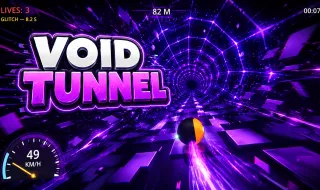
Void Tunnel is a high-speed endless runner that combines retro PS1-inspired visuals with intense synthwave energy and arcade-style survival gameplay. Players race through a constantly shifting neon tunnel filled with dangerous obstacles, visual distortions, and increasing speed that pushes reaction time to the limit.
Developed by HEQQA and released in May 2026, the game delivers a thrilling experience where every second matters. The objective is simple: survive as long as possible while traveling deeper into the endless tunnel. However, evolving obstacle patterns, changing colors, and visual effects make every run unpredictable and highly addictive.
Mastering the Neon Tunnel
The main goal in Void Tunnel is to travel the greatest distance possible without losing all three lives. Every collision with an obstacle removes one life, and the run ends after the third crash unless players use the optional revive feature.
As players progress, the game becomes drastically faster and more difficult. Speeds begin at approximately 25 km/h and can eventually exceed 300 km/h, transforming simple obstacle avoidance into an intense reflex challenge.
Progressive Obstacle System
Void Tunnel keeps gameplay exciting by gradually introducing new obstacle types throughout each run. Early sections feel manageable, but later stages become extremely demanding.
Players must quickly react to hazards such as:
- Large slabs blocking parts of the tunnel
- Full-diameter poles that require precise positioning
- Zigzag formations that force rapid direction changes
- Rings with narrow openings
- Pulsing mechanical doors
- Rotating cross-shaped barriers
This progression system keeps gameplay dynamic and prevents runs from feeling repetitive.
Risky Orb Mechanics
One of the game’s most creative mechanics involves glowing orbs scattered throughout the tunnel. Although they appear helpful at first, these orbs actually trigger dangerous visual effects.
Each orb activates a temporary effect lasting around ten seconds:
- Green orbs create wave distortions
- Pink orbs invert colors
- Yellow orbs trigger digital glitch effects
These visual disruptions make obstacle detection much harder, especially at high speed. Players can avoid the orbs for better visibility or collect them for an additional challenge.
Dynamic Themes and Visual Evolution
Void Tunnel stands out through its constantly changing visual presentation. The tunnel changes themes roughly every 220 meters, creating a vibrant cyberpunk atmosphere filled with neon colors and retro-inspired effects.
Players will encounter environments such as:
- Toxic green tunnels
- Vaporwave pink sections
- Lava-red environments
- Ice-blue corridors
- Cyber lime landscapes
- Deep purple synthwave zones
Obstacle colors also evolve during gameplay. They begin with bright orange tones before shifting into darker shades and eventually transforming into full rainbow-spectrum visuals at longer distances.
The combination of pixelated textures, curved tunnel effects, vignette filters, and synthwave lighting creates a distinctive retro-futuristic style.
Key Features
- Intense endless runner gameplay with increasing speed and difficulty
- Six unique obstacle types that unlock progressively
- Retro PS1-style graphics mixed with colorful synthwave visuals
- Orb traps that trigger glitch, distortion, and color inversion effects
- Dynamic tunnel themes and evolving obstacle colors
- Online leaderboards for competitive high-score chasing
- One-time revive feature for an extra survival opportunity
Tips for New Players
- Focus on smooth movement instead of sudden rotations
- Learn obstacle patterns gradually
- Avoid visual trap orbs during high-speed sections
- Stay near tunnel openings for easier repositioning
- Save the revive feature for long-distance attempts
Controls
Keyboard Controls
- A / D or Left / Right Arrow Keys — Rotate the tunnel left or right
- ESC — Pause the game
- R — Restart the current run
Mobile Controls
- Tap the left side of the screen to move left
- Tap the right side of the screen to move right